.webp)




.svg)

Key Takeaways (TL;DR)
AI can help spot deals that may slip before the forecast changes. It checks whether buyer activity and remaining work support the expected close date.
- Watch for warning signs: slower replies, missing approvers, stalled progress, and repeated close-date changes.
- Check the whole forecast: a few large deals slipping can leave a gap that other opportunities cannot cover.
- Follow up on alerts: confirm what is outstanding with the buyer before changing the number.
- Start with committed deals: connect CRM and activity data, assign someone to investigate, and track which warnings prove useful.
A sales forecast can look reasonable even when the deals behind it have started to stall. Buyers take longer to respond, next steps get pushed back, and procurement takes longer than expected. The close date may stay the same while the time available to finish the purchase gets shorter.
AI can help identify deals likely to slip by checking these changes across calls, emails, and CRM activity. It gives managers evidence to bring into a deal inspection, so they can question the timing before the deal misses its close date. This article explains what forecast risk is, which warning signs AI can detect, and what to check before changing the forecast.
What Is Forecast Risk?
Forecast risk is the chance that sales will close later, bring in less revenue, or fail to close compared with what your team has forecast.
A deal does not have to be lost to affect the number. If a purchase expected in September moves to October, it leaves a gap in the September forecast—even if the customer eventually signs. That is deal slippage.
When reviewing a deal, check whether the expected amount and close date are still supported by the buyer’s plans, remaining approvals, and agreed next steps.
Why Forecast Risk Gets Missed in Pipeline Reviews
A weekly pipeline review gives managers time to question deals, but the discussion depends on the information available. A rep may have updated the close date without checking whether the buyer can finish approvals in time.
Three gaps make risk harder to spot:
- Rep confidence can get ahead of buyer commitment. A positive call may leave the rep expecting a signature, even though the buyer has not confirmed the budget or purchasing timeline.
- CRM fields leave out context. Stage, amount, and close date tell you what is expected. Better sales pipeline visibility means checking those expectations against calls, emails, and meeting history.
- Things change between reviews. A missed meeting or delayed approval can put the timeline under pressure before the next forecast call.
AI can help bring those changes to the manager’s attention. The review still matters, but it can start with a specific question: what changed, and does it affect the expected close?
5 Ways AI Identifies Forecast Risk Before It Becomes a Miss
Here’s what AI can check when a deal’s close date no longer seems to match what’s happening with the buyer.
1. Changes in buyer engagement
A buyer who usually replies the same day starts taking a week. They cancel a call and leave the rep chasing another date. The opportunity still shows as committed, but there is less contact with the people expected to sign.
AI can pick up that change across emails and meetings and flag it for the rep or manager. The next step is to find out why. The buyer may be waiting on legal, or the purchase may have dropped down their priority list. Ask what is still outstanding and when they expect to move forward before deciding whether to keep the deal in this quarter.
2. Multi-threading analysis
Sometimes a rep speaks to the same person for weeks without knowing who will sign off on the purchase. That contact may be doing plenty of work internally, but the rep needs to ask who else has a say and how long approval usually takes.
AI can review the contacts involved in emails and meetings to help flag deals that depend on one relationship. Before keeping one of those deals in commit, check with your contact: has the budget owner agreed, and is there time for the remaining approvals?
3. Stage progression pattern matching
A deal moves into negotiation, but the technical review is still unfinished. Another stays in the same stage for weeks while the rep keeps the original close date. Both deserve a closer look.
AI can compare that progress with similar deals your team has won or lost. It may flag a deal that is taking longer than usual or has moved ahead with important work still outstanding.
Use the flag to ask what is holding things up. A longer technical review may be expected for a complex purchase. But if the buyer has not agreed on how or when to finish it, the close date may need to move.
4. Close date reliability scoring
A deal is due to close in two weeks, but the buyer has not started legal review. Similar purchases usually take a month to get through that step. It is worth asking where the close date came from.
AI can compare the time left with outstanding approvals, previous date changes, and how long similar deals took to close. That helps the manager spot dates that need checking with the buyer.
Ask who owns the remaining work and when they expect to finish it. If the date came from the rep’s quarter-end target, get a timeline from the buyer before relying on it in the forecast.
5. Pipeline coverage and concentration risk
Your forecast may depend heavily on a few large deals. If three opportunities make up 40% of the committed number, one delay could leave a sizeable gap—even when the rest of the pipeline is progressing.
AI can help show that exposure and check whether other opportunities could realistically close in the same period. Look at their stage, buyer activity, and remaining work before counting them as backup.
Review the biggest deals together. If two slip into next quarter, how much revenue moves with them? That gives you a clearer picture of the risk than reviewing each deal on its own.
How to Implement AI-Driven Forecast Risk Detection
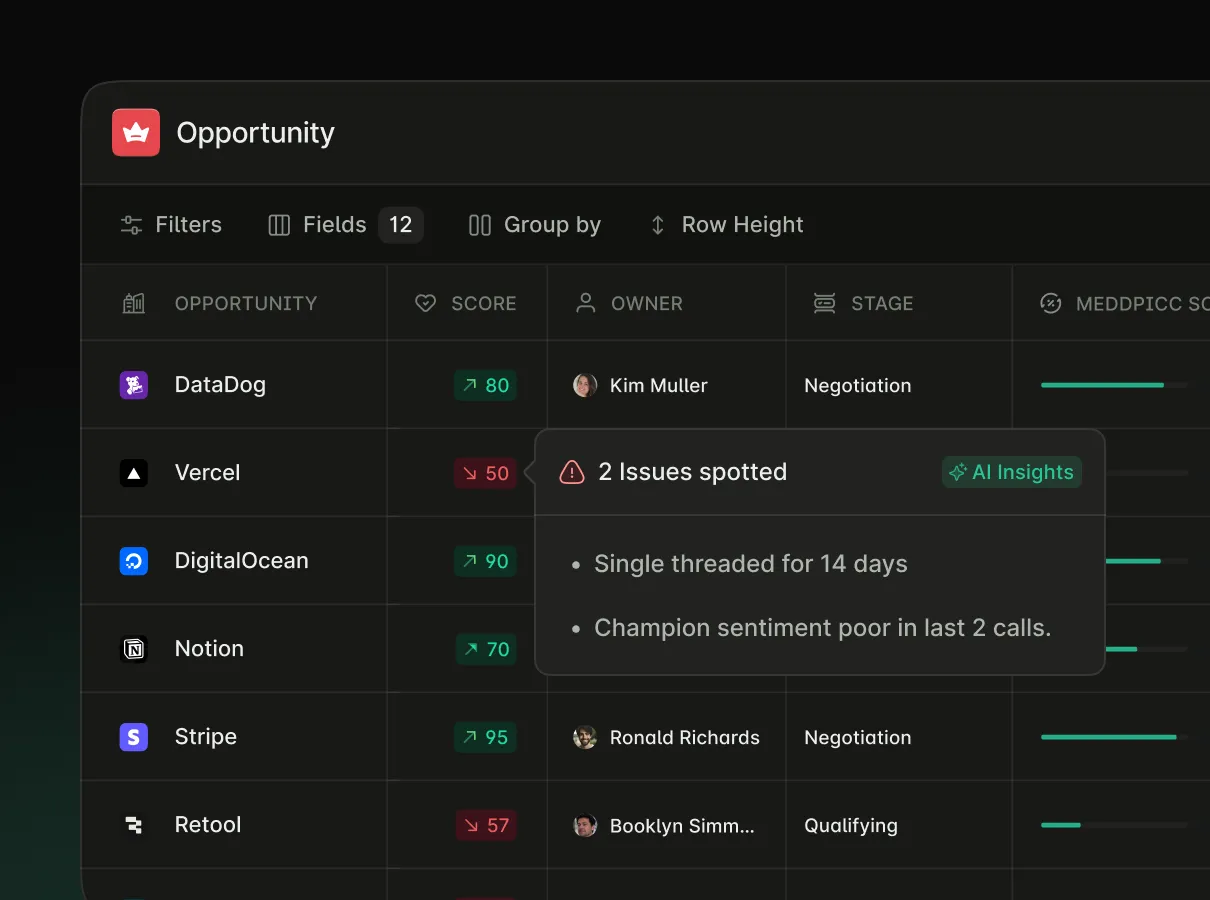
Start with the deals you expect to close this quarter. Get their records in order, connect the activity behind them, and agree on who will follow up when a warning appears.
Step 1: Check your CRM data. Are the close dates still realistic? Are amounts, stages, and buyer contacts up to date? Fix obvious gaps before turning on alerts, or the team may end up chasing problems that have already been resolved.
Step 2: Connect emails, meetings, and calls. A buyer may have asked to postpone the purchase while the CRM still shows the original close date. MaxIQ brings calls, emails, notes, and CRM activity together so managers can check for these gaps during a deal review.
Step 3: Compare similar deals. Look at past deals to see how long each stage took and where approvals caused delays. Compare like for like a small expansion will usually follow a different process from a new enterprise purchase. Check your tool’s data requirements rather than assuming a few months of history will be enough.
Step 4: Assign someone to follow up. Each warning needs an owner. If procurement has not started, the rep should ask the buyer who is handling it and how long it will take. The manager can use that answer to decide whether the deal still belongs in this quarter’s forecast.
Tip: Try this with committed deals first. Review the alerts together and note which ones helped you catch a problem. Adjust warnings that repeatedly turn out to be harmless before applying them across the pipeline.
Best Practices for Using AI to Reduce Forecast Risk
Bring flagged deals into your regular forecast review. Ask the rep about the specific concern: has the buyer confirmed the next step, is the budget approved, or has legal given a completion date? Check the evidence before changing the number.
Give more attention to risks that could materially affect the quarter. A delayed approval on a large committed deal may need action today. A slow reply on an early-stage opportunity can usually wait.
Record why you kept or changed the forecast. When the deal closes or slips, revisit that decision. Over time, those records help you see which warnings deserve attention and where the team needs better information.
Every capability walked through one by one, with screenshots from real calls.
.avif)