.webp)




.svg)

Key Takeaways (TL;DR)
A Revenue Orchestration Platform connects signals across CRM, calls, engagement, product usage, and customer success, then turns them into clear actions for reps and managers.
- Creates one view across pipeline, deals, forecasts, renewals, and accounts.
- Flags missing next steps, stakeholder gaps, and deal risks earlier.
- Automates follow-ups, CRM updates, and inspection workflows.
- Helps RevOps turn process rules into consistent frontline execution.
- Works best when it changes real decisions and actions, not just reporting.
Most B2B revenue teams don’t have a “strategy” problem. They have an execution problem.
The modern GTM stack is a patchwork of systems. CRM. Sales engagement. Call recording. Product usage. CS tools. CPQ. Billing. Support. Data warehouses. Each one captures something important. But none of them answers the question frontline teams keep running into:
What am I actually supposed to do next? On this deal? With this account, today?
That is where execution starts to break. Teams have data everywhere, but not enough clarity in the moment.
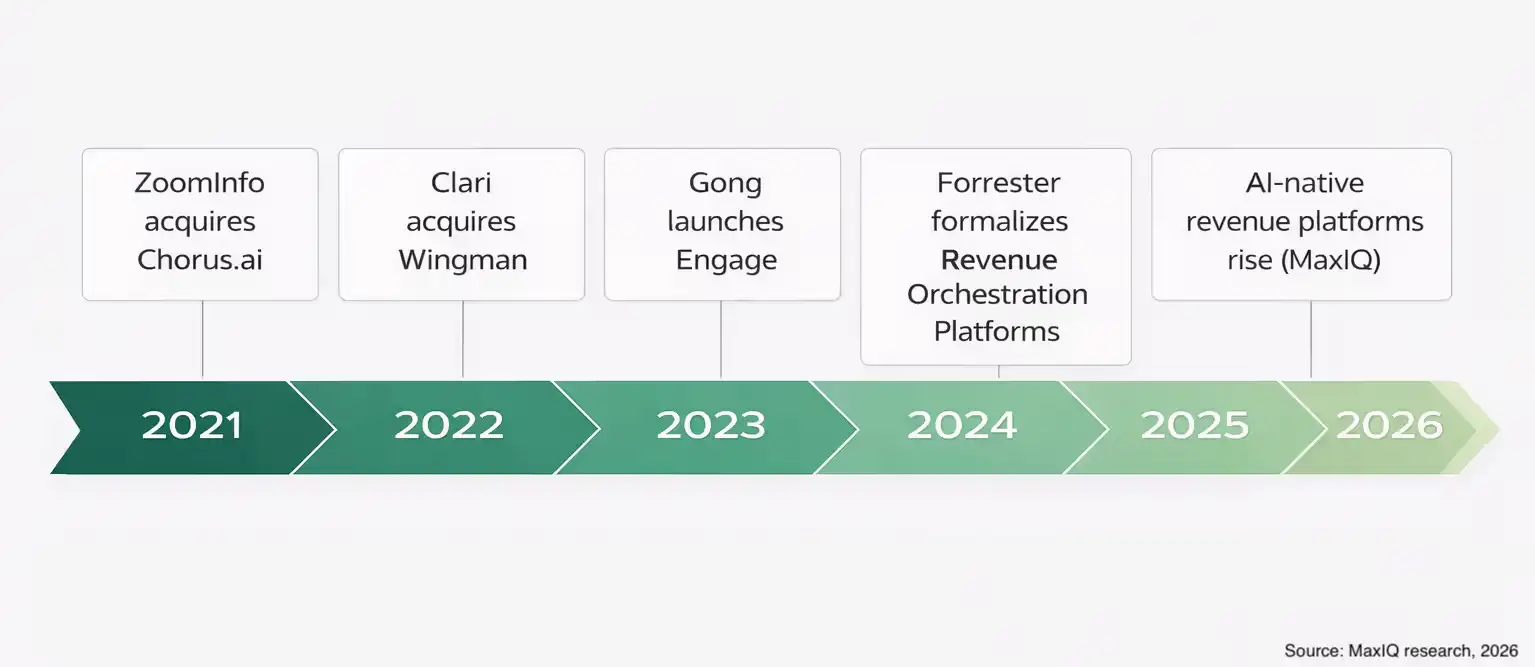
It is also why this category is getting more attention. Forrester introduced Revenue Orchestration Platforms as a distinct B2B category in 2024, which gave a name to a problem a lot of revenue teams were already feeling.
And that shift did not happen all at once.
It built over a few years as sales engagement, conversation intelligence, forecasting, and AI started moving closer together. The timeline below shows some of the moments that pushed the category in that direction.
This article breaks down what a Revenue Orchestration Platform is, what it does day to day, how frontline teams use it, and where it fits next to RevOps. If you are already evaluating tools, our guide to the best revenue orchestration platforms compares MaxIQ, Clari + Salesloft, Gong, Outreach, Aviso, and Terret.
What Is a Revenue Orchestration Platform?
A Revenue Orchestration Platform is an execution layer that connects the systems revenue teams already use, then standardizes revenue plays and enforces how they get executed.
That “execution layer” part matters. It’s not trying to be your CRM. It’s not trying to replace your tech stack. It’s the connective tissue that makes signals usable, and turns process into real behavior.
Here’s the simplest definition.
A Revenue Orchestration Platform sits on top of your revenue stack, pulls in signals from across tools (CRM, buyer engagement, call intelligence, CS tools, product usage, support, renewal), and then guides reps and managers through consistent workflows for what to do next.
The core promise is pretty straightforward:
- One operational view of revenue across pipeline, deals, renewals and accounts.
- Guided workflows that push the right actions back into where people work.
What Revenue Orchestration Actually Does
Revenue orchestration coordinates people, workflows, and signals across the full revenue cycle.
Pipeline creation. Deal execution. Renewals and expansion. Forecasting. Manager inspections. Handoffs to legal or SEs or CS. The whole messy reality.
And the output is one thing. The next best action for every rep and manager, based on what is actually happening in their deals.
This is why orchestration is not “more data”. Plenty of teams already have data. What they don’t have is a closed loop system that turns data into execution:
- Signal detected
- Action triggered
- Outcome tracked
- Pattern learned and improved
That loop is the difference between a dashboard and an operating system.
Revenue action orchestration, specifically
A lot of platforms talk about orchestration, but the practical version looks like this:
- Deal and account signals come in (call outcomes, CRM changes, product usage, risk flags, engagement shifts).
- The platform converts those signals into guided steps.
- Those steps get routed to the right person, at the right time, with context.
So instead of “this deal looks risky” you get “legal redlines have been open for 12 days, procurement has not been introduced, next meeting is not scheduled. Here is the play. Assign legal. Confirm mutual plan. Book exec alignment.”
Still simple, but now it’s executable.
And again, it does not replace your CRM or engagement tools. It connects them. It tells the team what to do next, then makes it hard to ignore.
How Revenue Teams Are Leveraging It?
The best way to think about revenue orchestration is as a daily operating system for revenue. Below are the common day to day use cases, the ones teams actually pay for.
Use case 1: Pipeline reviews that change what happens next
A lot of pipeline reviews are theater.
The root problem is that pipeline signals are scattered and stale. Stakeholder mapping is in someone’s head. Mutual plans are… maybe in a doc. Maybe not.
What orchestration changes is the inspection standard.
Instead of “tell me about this deal”, the platform can inspect deals against consistent criteria, like:
- stage quality and stage exit criteria
- next step and next meeting scheduled
- mutual plan exists and is current
- stakeholder coverage and gaps
- risk flags and why they are flagged
Then it auto identifies what is missing. So the manager workflow gets cleaner and you talk about the two deals that are actually at risk, instead of ten deals that are “fine”.
Use case 2: Running complex deals without losing track
Deal execution mostly happens in between meetings. It’s about figuring out who the stakeholders are, planning what needs to happen next, pulling in the right people like SEs or legal, and just keeping the deal moving forward without any big surprises popping up.
Most teams say they do all this stuff, but honestly, it’s all over the place. Every rep has their own style and way of doing it, until something breaks or a big problem shows up.
Orchestration basically turns deal execution into a clear, guided process with:
- Real action plans that are actually tied to each deal stage
- Checks to make sure the stage goals are really met, not just “yeah it’s fine”
- Prompts to loop in multiple stakeholders when that’s needed
- Qualification steps built right into the workflow so they don’t get skipped
It also helps catch warning signs before deals stall out, like when there’s no next meeting on the calendar, or the champion feels weak, or there are bottlenecks around pricing and legal.
Plus, it also makes handoffs a lot smoother. Everyone is working from the same plan, the same timeline, and they all understand the risks and the next steps.
Use case 3: Turning buyer signals Into rep actions
Sales engagement tools are useful. But the signals they produce often stay trapped in their own UI. Orchestration connects engagement to execution.
It can use email and meeting activity plus buyer intent signals as part of deal health, and then trigger next actions based on what changed.
Examples of actionable triggers:
- a key stakeholder goes dark for 10 days in late stage
- meeting cadence drops after a pricing conversation
- a new persona joins late (hello, procurement or security)
- competitor is mentioned on a call and then engagement drops
The outcome is not “engage more”. It’s engage the right people with the right next step.
Use case 4: Sales workflow automation that cuts selling time
This is the less glamorous use case, but it’s the one reps feel immediately.
A lot of selling time gets destroyed by admin, Orchestration automates the boring parts while leaving judgment and messaging to humans.
So it can do things like:
- create follow up tasks based on call outcomes
- prompt reps to confirm next step and mutual plan updates
- capture meeting to next step, then nudge until it is done
- enforce CRM hygiene without making reps hate life
This is also how teams standardize execution.
Use case 5: Pipeline management and forecasting
Forecasts often fail because they rely too much on gut feelings. Orchestration brings clear signals to improve accuracy, like:
- Activity trends and meeting frequency
- Call insights related to next steps and risks
- Stakeholder involvement and influence
- Progress on mutual plans, not just deal stages
- Product and customer success health for renewals
Forecast updates become more structured. Instead of vague guesses, reps share. This means fewer surprises for leadership, cleaner reports, and a clearer chance to act early when it matters.
Revenue Orchestration vs. RevOps: What Is the Difference?
RevOps is the strategy and systems function.
They design the process. Govern the systems. Define stage criteria. Own analytics. They are the people making sure the machine makes sense.
Revenue orchestration is the execution layer that operationalizes that RevOps work in the daily workflow of frontline teams.
This is the misconception to clear up:
“If we have RevOps, we already do orchestration.”
Not really.
RevOps designs. Orchestration enforces and activates.
A practical example:
- RevOps defines stage exit criteria for Stage 3. Required stakeholder roles, mutual plan, next meeting scheduled, business case documented.
- Orchestration checks whether those criteria are actually present.
- If they are missing, orchestration triggers actions. Prompts the rep. Flags the deal for the manager. Routes a play.
So the takeaway is simple.
Orchestration is how GTM alignment becomes consistent behavior, week after week, rep after rep.
What's the role of AI in Revenue Orchestration
AI is not the point of orchestration. But it is a very real accelerant.
Used well, AI helps with signal detection and prioritization. It should not replace sales judgment. It should reduce the cost of figuring out what is happening.
Some practical AI wins inside orchestration tend to look like:
- Summarizing call moments that matter (not full transcripts no one reads)
- Extracting next steps, risks, objections, and timeline language from calls
- Identifying missing stakeholders based on who is showing up, and who isn’t
- Flagging slippage patterns across a portfolio of deals
Also, AI is only as good as connected sources. If the platform only sees a half maintained CRM, it will guess. If it sees CRM plus calls plus engagement plus product and CS signals, it can be useful in a way that feels obvious. This highlights the importance of integrating AI with CRM for effective revenue forecasting.
How to Evaluate a Revenue Orchestration Platform
This category can get fuzzy fast, so it’s normal to look for third party evaluations. People want category clarity, capability comparisons, and a sense of vendor maturity.
During evaluation, here’s what to validate.
1. Time to value
How fast can you get to a working workflow that reps and managers actually use. Weeks matter here, not quarters.
2. Integration depth
Does it integrate with your CRM in a real way? Can it read and write? Can it pull call insights? Can it ingest engagement signals? Can it incorporate CS and product health?
If it cannot connect to the sources that matter, orchestration turns into yet another place to manually update.
3. Workflow flexibility
Can you model your plays? Your stage criteria. Your inspection process. Your forecast motion. Or does everything get forced into a generic template?
4. AI explainability
If AI flags a risk, can the rep and manager see why. And does it recommend an action that matches how your team sells.
5. Frontline adoption
This one is easy to ignore and then regret later.
Do reps get value without changing everything about how they work. Does it push tasks and guidance back into their flow. Does it save time? If adoption requires hero level change management, it will struggle.
A simple proof approach:
Run a live pilot on a defined set of deals.
Pick a segment or a team. Pick real opportunities. Then measure whether the platform actually changes decisions and actions. Does it surface risks earlier? Does it lead to better next steps? Does it tighten forecast hygiene? Does it reduce admin.
If it does not change behavior, it is not orchestration. It is reporting.
How MaxIQ Helps Revenue Teams Orchestrate at Scale
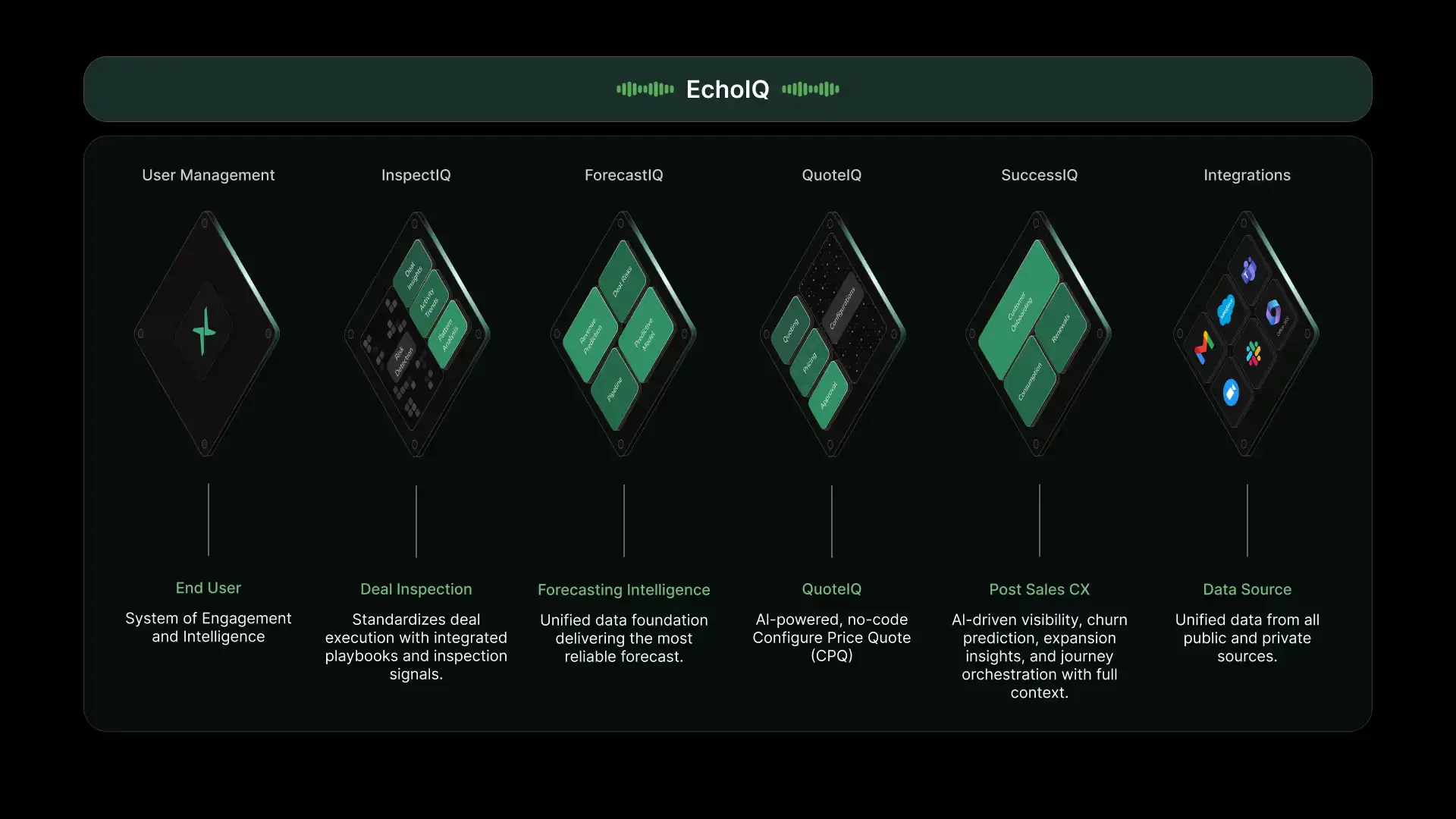
MaxIQ connects pipeline inspection, AI call intelligence, forecast submissions, and account health signals into one platform, so revenue teams don’t have to stitch together answers across tools. It works alongside your CRM and existing workflows, pulling the signals that matter and turning them into guided execution.
With everything in one view,
- Teams can see what is happening across deals and accounts.
- They can identify what is at risk and why?
- Teams know what to do next?
- Reviews get sharper.
- Forecast calls get cleaner.
- Managers spend less time chasing updates.
- Managers spend more time coaching the moments that move deals.
A great example of MaxIQ's effectiveness is illustrated by Snowflake's decision to choose MaxIQ for their revenue forecasting. This showcases how the platform can transform the way businesses approach revenue forecasting.
If you want to see what that looks like with your own pipeline and your own process, book a demo and run it against a real set of deals. That is usually the fastest way to tell if orchestration will actually stick for your team.
Every capability walked through one by one, with screenshots from real calls.
.avif)