.webp)




.svg)

Revenue teams today are expected to do more than manage pipelines. They need to understand customer conversations, align teams, collaborate effectively, and forecast with confidence - all while spending less time searching for information.
Table of contents
- What’s New in MaxIQ
- AI-Powered Answers with Ask AI
- Turn Customer Conversations into Actionable Insights with EchoIQ
- Collaborate Better with Rooms
- Simplified Forecasting for Revenue Teams
- A More Powerful Pipeline Experience
- Bringing Revenue Teams Together
What’s New in MaxIQ
Over the last two quarters, MaxIQ has introduced major enhancements designed to help revenue teams work smarter and move faster.
From AI-powered workflows and meeting intelligence to collaborative Rooms and a simplified forecasting experience, these updates bring together the information, insights, and workflows teams need to drive better outcomes.
AI-Powered Answers with Ask AI
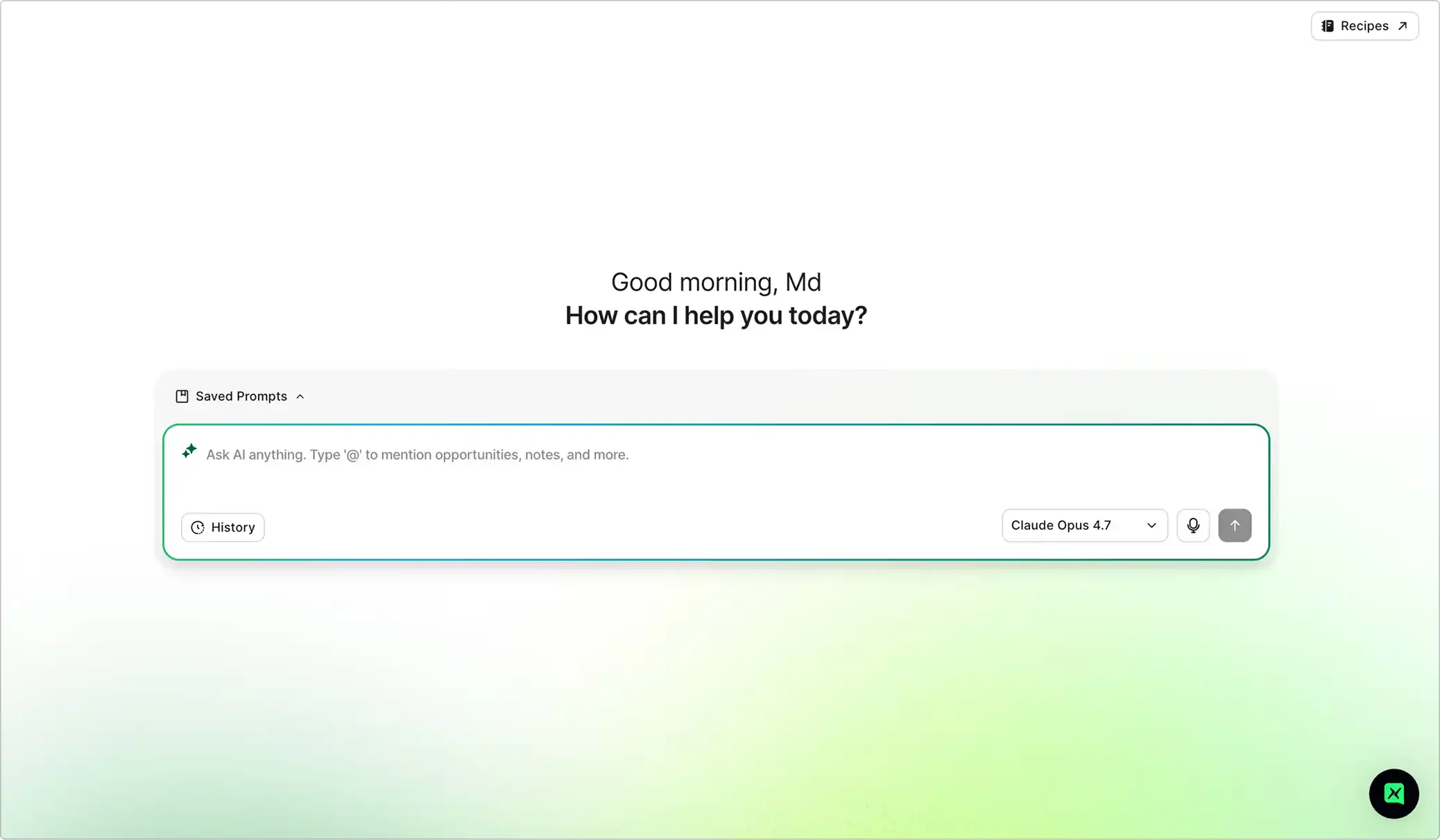
Important information is often scattered across notes, meetings, emails, tasks, and CRM records. Ask AI brings everything together through a conversational interface, helping users find answers faster without navigating across multiple pages.
Ask AI enables teams to:
- Ask questions in natural language and receive context-aware answers using MaxIQ data.
- Analyze opportunity health, forecast performance, and customer engagement.
- Generate follow-up emails, handoff documents, and summaries.
- Save prompts and conversations for future use.
- Continue conversations in a dedicated workspace.
- Generate AI-powered suggestions directly from Notes.
Instead of searching for information, users can simply ask.
Turn Customer Conversations into Actionable Insights with EchoIQ
Customer meetings contain critical signals that influence deal health, forecasting accuracy, and next steps. EchoIQ captures those signals automatically and makes them accessible across MaxIQ.
With EchoIQ, teams can now:
- Record and transcribe customer meetings.
- Generate meeting summaries, action items, next steps, and open questions.
- Surface conversation insights directly within workflows.
- Use AI to ask questions about meeting recordings.
- Improve CRM accuracy using conversation-based signals.
- Support more informed forecasting and pipeline reviews.
By transforming conversations into structured insights, EchoIQ helps teams spend less time documenting meetings and more time acting on them.
Collaborate Better with Rooms
Revenue teams frequently need to share information across departments and with customers. Rooms provides a centralized space to organize, collaborate, and securely share important updates and meeting highlights.
Instead of sending entire recordings, users can share only the most relevant moments.
With Rooms, teams can now:
- Create dedicated collaboration spaces.
- Organize clips from one or multiple meetings.
- Share information internally or with external stakeholders.
- Add notes, updates, and tasks within a room.
- Track progress through task management.
- Maintain visibility while controlling what external users can access.
Rooms make it easier to keep everyone aligned without overwhelming them with unnecessary information.
Simplified Forecasting for Revenue Teams
Forecasting should help teams make decisions not create additional work.
To streamline forecast submissions, MaxIQ now offers Simple Forecasting, allowing organizations to reduce complexity while maintaining visibility into revenue expectations.
Recent forecasting enhancements include:
- Simple Forecasting for category-level submissions.
- Support for current and next fiscal year forecasting.
- Expanded quarter and fiscal period selection.
- Faster access to updated forecasting data.
- Forecast call visibility directly within Pipeline views.
- Improved layouts and submission workflows.
- Cleaner forecasting grids and navigation.
These updates help sales representatives submit forecasts more quickly while giving managers better visibility into performance.
A More Powerful Pipeline Experience
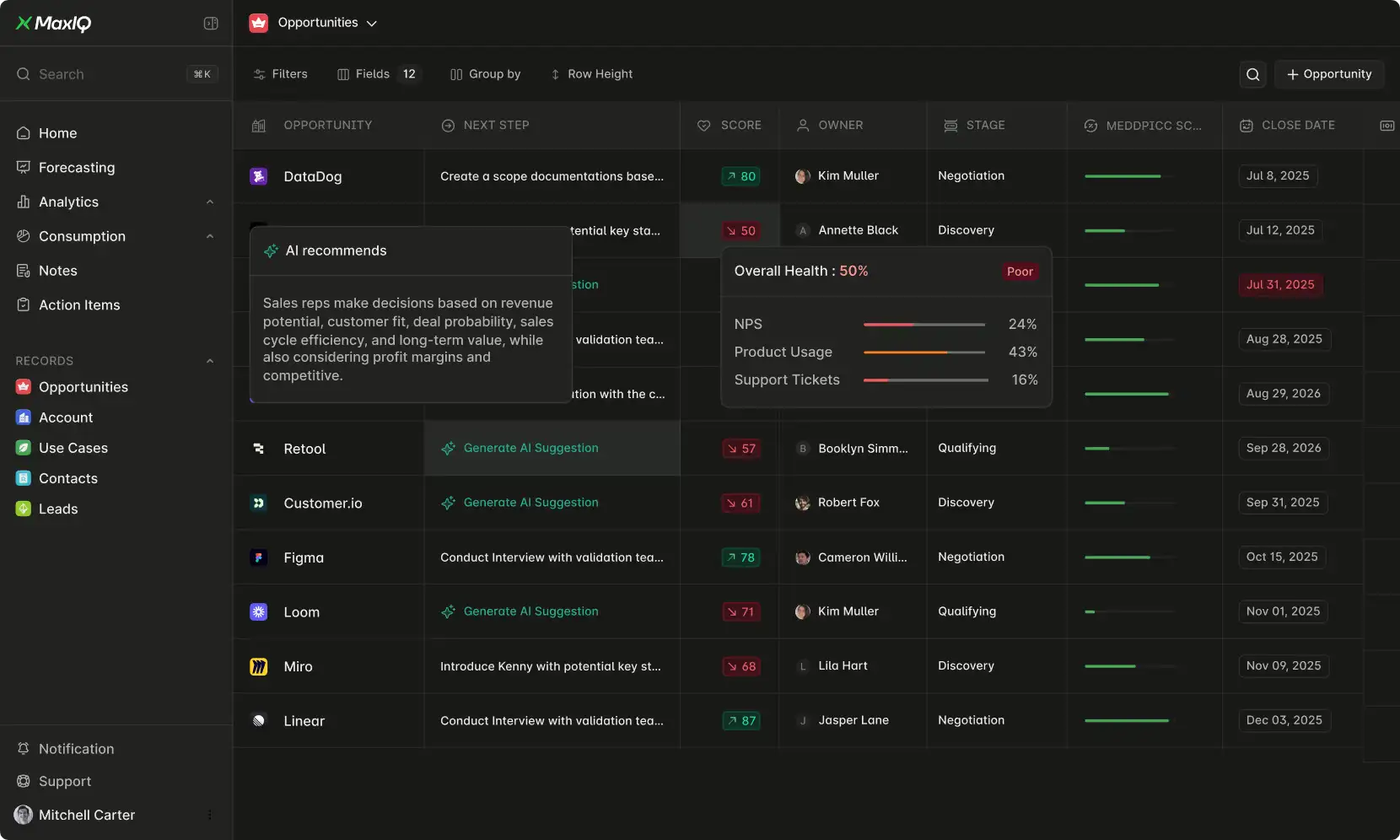
Pipeline remains the operational hub for reviewing, managing, and inspecting opportunities. Recent enhancements make it easier to identify risks, analyze changes, and take action.
Key improvements include:
Multiple Pipeline Views
Users can create and manage multiple pipeline view tabs, making it easier to switch between different workflows and priorities.
Enhanced Group By and Aggregation
Grouping now includes improved aggregate calculations and better support for numerical analysis, helping teams understand pipeline composition at a glance.
Pipeline Inspect
Inspect provides deeper visibility into records by surfacing field-level details, counts, and aggregated values without leaving the pipeline view.
Opportunity Health Signals (OHS)
Teams can quickly identify opportunities requiring attention through:
- Attention and Critical signals.
- At Risk, Watch, and On Track filters.
- Enhanced visibility into important pipeline changes.
Improved Sharing and Collaboration
Users can now:
- Share pipeline views.
- Copy and distribute view URLs.
- Export views to CSV.
- Share views across teams and levels.
Together, these enhancements make Pipeline more actionable, collaborative, and insight-driven.
Bringing Revenue Teams Together
The latest MaxIQ enhancements focus on a single goal: helping revenue teams spend less time searching for information and more time acting on it.
With AI-powered assistance, conversation intelligence, collaborative workspaces, simplified forecasting, and a more powerful pipeline experience, MaxIQ continues to bring Sales, Success, and RevOps together on a single platform.
Whether you're reviewing customer conversations, sharing key updates, submitting forecasts, or inspecting pipeline health, MaxIQ helps teams stay aligned and move forward with confidence
Every capability walked through one by one, with screenshots from real calls.
.avif)


.webp)